
Key Takeaways
- AI software splits into four distinct types now, GenAI apps, custom ML models, AI agents, and AI-assisted builds, each needing different teams and timelines.
- Define the actual problem before choosing any technology, and honestly check whether AI is even needed for it.
- Data quality decides most outcomes; budget two to three times more time for preparation than initially planned, since teams consistently underestimate this.
- AI coding tools like Cursor and Claude Code speed up development significantly, but the code still needs rigorous security review before shipping.
- GDPR and HIPAA compliance is far cheaper to build in from day one than to retrofit after launch, especially in regulated industries.
- Development costs range from $15,000 for a simple GenAI app to over $1 million for a full enterprise platform, plus ongoing maintenance.
- Building in-house and hiring outside help aren't mutually exclusive; many teams do both, starting with a partner and taking over later.
AI is changing the way software is built. According to JetBrains' 2025 Developer Ecosystem Survey, 85% of developers now use AI tools as part of their everyday coding workflow. Gartner also predicts that by 2028, 75% of enterprise software engineers will be using AI code assistants in their work. These numbers reflect how quickly software development is evolving.
A few years ago, building AI software usually meant training a machine learning model on your own data. While that's still a valid approach, it's no longer the only one. Today, businesses can build AI software in several different ways, from integrating large language models (LLMs) through APIs to creating autonomous AI agents or developing custom machine learning models. Choosing the wrong approach is one of the biggest reasons AI projects take longer than expected or exceed their budgets.
This guide is designed for founders, CTOs, product leaders, and developers looking for practical, up-to-date advice on building AI software in 2026. Instead of repeating the same steps found in older machine learning tutorials, it focuses on the approaches teams are using today based on real-world development experience across industries such as healthcare, finance, logistics, manufacturing, and eCommerce.
Inside this guide, you'll learn how to identify the right type of AI software for your project, plan and build it step by step, choose the right tools and technology stack, estimate development costs, assemble the right team, address security and compliance requirements, and decide whether it's better to build in-house or work with an AI development partner.
What Does "Building AI Software" Mean in 2026?
In 2022, building AI software almost always meant training a custom machine learning model using your own data. That's still a common approach, but it's no longer the only one. Today, AI software can take several forms, each with its own development process, team requirements, timeline, and budget.
Understanding these differences is an important first step. According to McKinsey's AI adoption research, the top-performing 20% of organizations are seeing productivity gains of 16% to 30% and quality improvements of 31% to 45%. Many other AI initiatives, however, fail to deliver similar results because teams choose a technical approach before clearly defining the type of AI solution they actually need.
Before setting a budget, hiring a team, or starting development, take the time to identify which of the four types of AI software best fits your use case. Making that decision early helps you choose the right architecture, avoid unnecessary costs, and keep your project on the right track from the start.
The 4 Types of AI Software
Type 1: GenAI-Powered Apps (LLM API Integration)
These are applications built on top of large language model APIs like GPT-4o, Claude, or Gemini. You're not training anything, you're calling an existing model and building product features around it. Think AI writing assistants, chatbots, document summarizers, and code review tools. Long-form products sit here too, like an AI book writer that turns an outline into full chapters on top of the same hosted models.
If speed is your priority, this approach is hard to beat. Most teams can launch within weeks by building on existing LLM APIs instead of training models from scratch. For most startups and business AI products launching in 2026, this is the right starting point.
Type 2: Custom ML Model Software
Custom machine learning models are the right choice when your business relies on proprietary data or highly specialized predictions. Fraud detection, demand forecasting, image classification, and predictive maintenance systems usually fall here. It requires real data science expertise, a meaningful amount of quality data, and training infrastructure. Timelines run from several months to a year.
It's worth investing in a custom model when your problem is specific to your business and an off-the-shelf model genuinely can't solve it, not because it sounds more technically impressive.
Type 3: AI Agent Software
Agent software goes further than a chatbot. These systems plan, use tools, and complete multi-step tasks with little or no human input in the loop, things like autonomous customer support handling or research agents that pull from multiple sources. If this is the type you're building, our dedicated guide, How to Build an AI Agent, goes much deeper into agent-specific architecture and tooling.
Type 4: AI-Assisted Software
Many software teams now rely on AI coding assistants to speed up development, even when the final product doesn't include AI features. The software itself might be a completely ordinary SaaS product, mobile app, or internal tool, nothing "AI" about the end product. But it was built dramatically faster using AI coding tools like Cursor, Claude Code, or GitHub Copilot. Rather than replacing developers, these tools help them write, review, and refactor code more efficiently.
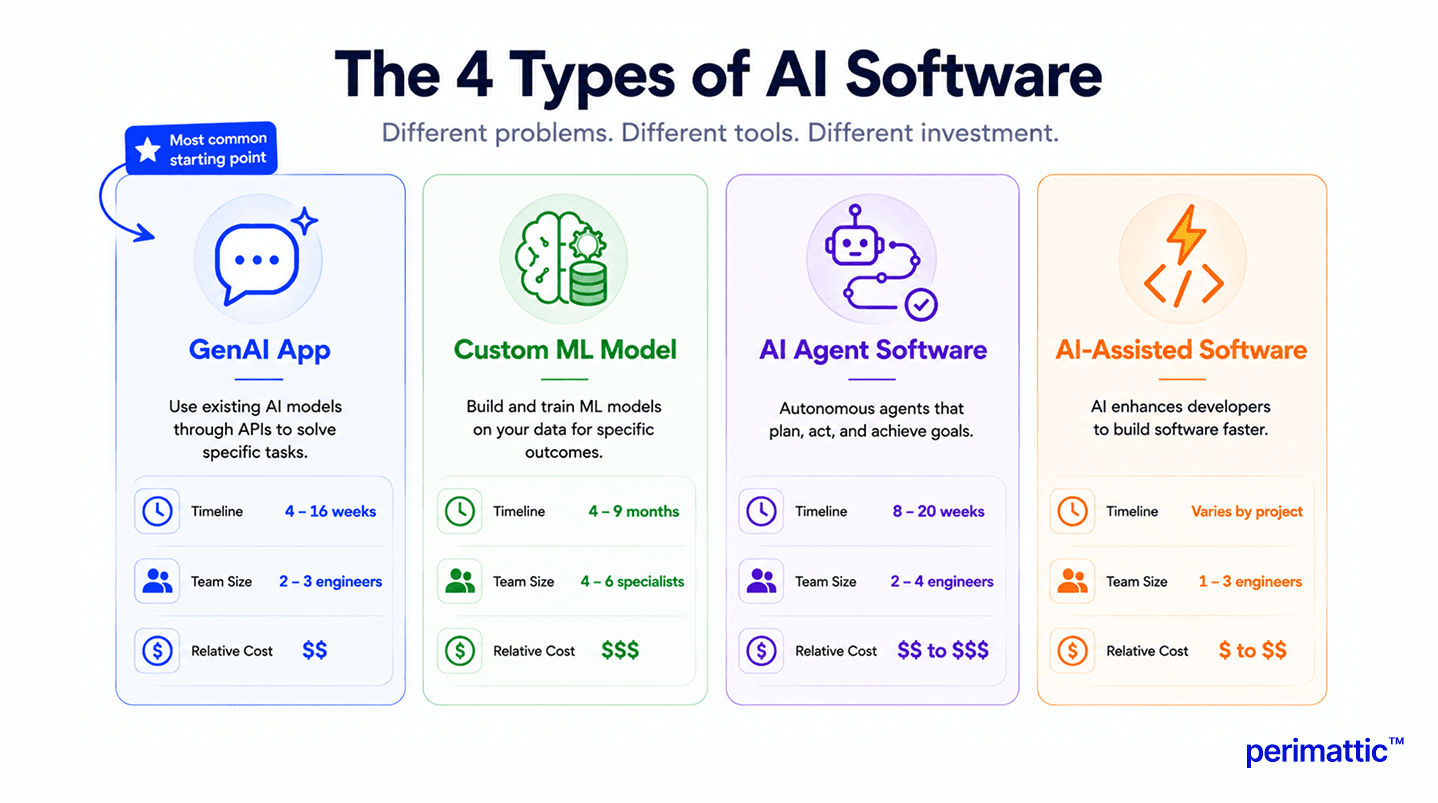
| AI Software Type | Best For | Key Tech | Timeline | Team Needed | Relative Cost |
|---|---|---|---|---|---|
| GenAI App (LLM API) | Most startups & business AI products in 2026 | OpenAI/Claude/Gemini API, LangChain, vector DB | 4 to 16 weeks | 2 to 3 engineers | $$ |
| Custom ML Model Software | Proprietary data problems, domain-specific prediction | PyTorch, TensorFlow, SageMaker, MLflow | 4 to 9 months | 4 to 6 specialists | $$$ |
| AI Agent Software | Multi-step autonomous workflow automation | LangGraph, CrewAI, AutoGen, tool APIs | 8 to 20 weeks | 2 to 4 engineers | $$ to $$$ |
| AI-Assisted Software Build | Shipping traditional software 30 to 55% faster | Cursor, Claude Code, GitHub Copilot | Varies by project | 1 to 3 engineers | $ to $$ |
Before You Write a Line of Code: Planning Your AI Software
The planning phase is the one teams skip most often, and it's usually the one that determines whether the whole project succeeds.
Define the problem you're solving, not the tech you want to use. Start with the business problem, not technology. AI should support a clear objective rather than become the objective itself. The most common reason AI projects fail is that a team picked a technology before clearly defining what outcome they needed. Start with the business problem, then work backward to the right tool.
Validate that AI is the right solution. This is the section most vendor-written guides skip, because it's not in their interest to tell you that you might not need AI. In many cases, if your problem can be solved with a well-structured database query, a rules engine, or a simple lookup table, adding AI just adds cost, complexity, and unpredictability without a real benefit. Reserve AI for tasks that genuinely require contextual judgment, pattern recognition across large or messy datasets, natural language understanding, or personalization at real scale.
Assess your data readiness. Do you have labeled training data if you're going the custom ML route? Do you have the proprietary knowledge you'd need to embed for a RAG-based GenAI app? What privacy or regulatory constraints apply to that data?
Choose your approach: code, no-code, or API-first. A simple three-way framework helps here. Code-based gives you maximum control but needs an engineering team. API-first gets you to market fastest with some vendor dependency. No-code suits non-technical teams but limits customization. We'll go deeper on the no-code path later in this guide.
If you're validating a concept before committing to a full build, an AI proof of concept is often the smartest first step, since it tests the idea with real users before you invest in the full architecture.
Step 1: Define Requirements and Success Metrics
Before any development starts, get specific about both business and technical requirements. What does success actually look like, in numbers you can measure? If you're building a support chatbot, is success a reduction in ticket volume, a faster average resolution time, or a customer satisfaction score? Vague goals like "make support better with AI" lead directly to vague, unmeasurable outcomes.
Write down your target metrics before development begins, not after launch. This single habit prevents a huge amount of scope creep and disagreement later.
Step 2: Collect, Prepare, and Validate Your Data
Data is the foundation everything else sits on. More AI projects fail because of poor data quality than because of a wrong algorithm choice or the wrong framework.
Data sources. Internal databases, CRM records, and system logs are usually your richest source. Public datasets from places like Kaggle, Hugging Face Datasets, and Google Dataset Search can supplement or bootstrap a project. Synthetic data generation is useful when real data is scarce or privacy-restricted. Web scraping is an option too, but only with proper legal clearance.
Data cleaning. This means removing duplicates, deciding how to handle missing values (either filling them in or excluding them), standardizing formats, and dealing with outliers. Python's Pandas library, R's dplyr, or pipeline tools like dbt are the standard toolkit here.
Data labeling. For supervised machine learning, every training example needs a correct label attached. You can do this manually (slow but accurate), through crowdsourced labeling services like Scale AI or Labelbox, or using automated labeling with an existing model (cheaper, but lower quality).
Data privacy. If your software touches personal data, customer names, health records, financial details, get your GDPR or HIPAA compliance sorted before you even start collecting data, not after. Think about data minimization, anonymization, consent, and audit logging from day one.
A good rule of thumb: whatever time you've budgeted for data preparation, double or triple it. Teams consistently underestimate this by two to three times.
Step 3: Choose Your AI Approach and Technology Stack
Your tech stack depends heavily on which of the four types you're building.
For GenAI apps: your core decision is which LLM to use, GPT-4o, Claude Sonnet 4.6, Gemini 2.5, or an open-source option like Llama, weighing cost against performance for your specific use case. LangChain helps for more complex integrations, while calling the provider's SDK directly keeps things simpler if your needs are more contained.
For custom ML: you're choosing between deep learning frameworks like TensorFlow or PyTorch (for neural networks, computer vision, and NLP fine-tuning) and classical ML libraries like scikit-learn (for classification, regression, and clustering). Track your experiments with MLflow or Weights & Biases and consider a feature store like Feast or Tecton once your models start multiplying.
For AI agent software: LangGraph, CrewAI, AutoGen, or a raw SDK implementation are your main options. Our AI agent guide covers this comparison in much more depth.
AI coding tool stack (Type 4): Cursor works well for full-stack developers coordinating changes across many files. Claude Code is strong for agentic, terminal-first coding tasks and understanding large codebases. GitHub Copilot Workspace fits teams that want an issue-to-PR workflow inside GitHub itself. Windsurf is a solid competitive alternative to Cursor.
The 2026 AI Software Tech Stack
Most competitor guides give you a flat list of tools with no real structure. Here's the stack organized by what each layer actually does.
| Layer | What It Does | 2026 Top Tools | Best For |
|---|---|---|---|
| LLM / Foundation Model | Reasoning, text generation, code generation | GPT-4o, Claude Sonnet 4.6, Gemini 2.5 Flash, Llama 3.1 | All GenAI and agent projects |
| Orchestration | Manages agent loops, chaining, multi-agent coordination | LangChain, LangGraph, CrewAI, AutoGen, OpenAI Agents SDK | Complex multi-step AI workflows |
| Memory & Retrieval | Stores and retrieves context, documents, long-term knowledge | Pinecone, Weaviate, Chroma, FAISS, Redis | RAG apps, agents needing memory |
| ML Training & Experiment | Trains, fine-tunes, tracks custom models | PyTorch, TensorFlow, scikit-learn, MLflow, Weights & Biases | Custom ML model projects |
| Data Pipeline | Ingests, transforms, prepares data at scale | dbt, Apache Airflow, Kafka, Spark, AWS Glue | Data-intensive AI software |
| Model Serving | Serves predictions via API at scale | FastAPI, TorchServe, TF Serving, SageMaker, Azure ML | Production ML deployments |
| Cloud AI Platform | Managed LLM access, training infra, compliance | AWS Bedrock, Azure OpenAI Service, GCP Vertex AI | Enterprise AI with governance needs |
| AI Coding Tools | Builds the software itself, faster | Cursor, Claude Code, GitHub Copilot Workspace, Windsurf | All development projects in 2026 |
| Observability & Monitoring | Traces, debugs, monitors AI systems in production | LangSmith, W&B, Prometheus, Grafana, Sentry, Datadog | All production AI software |
| Security Scanning | Detects vulnerabilities in AI-generated code | Snyk, SonarQube, GitHub Advanced Security, Veracode | All projects, especially regulated ones |
Step 4: Design the Architecture
Monolithic vs. microservices. For a smaller GenAI app, a monolith is often faster to build and easier to maintain early on. Once you're running multiple models, agents, or a growing team, microservices give you the flexibility to scale and deploy pieces independently.
Design the data pipeline before you build the application layer on top of it. Decide how data flows in, gets transformed, and gets served to your model, and build this with future scale in mind rather than just what you need on day one.
Plan for scale from day one. Even if you're launching small, think through what happens when usage grows 10x. Retrofitting scalability after launch is far more expensive than designing for it up front.
Step 5: Build and Train Your AI Software
Building GenAI apps centers on prompt engineering, retrieval-augmented generation (RAG) for grounding responses in your own data, and integration work connecting the LLM to your product's actual features.
Training and fine-tuning ML models involves the classic cycle: train, evaluate, adjust, retrain, working through your chosen framework with your experiment tracking tools running throughout.
Building AI Software Faster With AI Coding Tools (2026)
This is one of the biggest blind spots in almost every other guide on this topic. In 2026, 85 percent of developers use AI coding tools regularly. Teams using them complete projects 55 percent faster, according to joint research from GitHub and Accenture covering nearly 4,800 developers and get to market roughly 30 percent sooner per McKinsey's findings.
Cursor suits full-stack developers for building AI software directly. Its Background Agents can work in isolated virtual machines on their own git branches, and Cloud Agents can be triggered straight from Slack or GitHub. It shines when you need to coordinate changes across many files at once.
Claude Code is a terminal-first, agentic coding tool. It can read large codebases in context and handle long, involved tasks like adding authentication to an API or refactoring a module to use a repository pattern, including iterating on its own test failures along the way. It's especially strong for substantial architectural work.
GitHub Copilot Workspace automates the path from issue to pull request inside GitHub itself, a good fit for teams that want the AI to own more of the development lifecycle from ticket to code review.
One important warning belongs right here: 45 percent of AI-generated code introduces OWASP Top 10 vulnerabilities, according to Veracode's 2025 GenAI Code Security Report. These tools genuinely speed up development, but they require rigorous code review and automated security scanning, not blind trust in the output.
Step 6: Test, Evaluate, and Validate
AI software needs a different kind of testing than traditional software. Your usual unit and integration tests still matter, but on their own they're not enough.
AI-specific testing includes accuracy evaluation using metrics like precision, recall, and F1 score for classification tasks, hallucination testing for LLM-based apps (checking for confident but wrong answers), bias and fairness testing across demographic groups, and adversarial testing, sometimes called red-teaming, where you deliberately try to break the system or make it behave badly.
For GenAI apps specifically, test prompt variations systematically. A small wording change in a system prompt can shift output quality and reliability dramatically, so build a regression test suite specifically for prompt changes.
Performance testing should cover latency under load (LLM API calls are slower than a typical database query), cost per request, since you're paying per token, and how the system handles concurrent users.
Build a golden dataset: a curated set of test inputs paired with expected outputs, and run it every time you make a change. This becomes your AI regression suite. And for anything high-stakes, medical, financial, or legal outputs, never skip a human review stage before those outputs reach a real decision.
Step 7: Deploy to Production
Platform choice. AWS Bedrock gives you managed LLM access plus tight AWS ecosystem integration, and it's SOC 2 and HIPAA eligible. Azure OpenAI Service fits teams already on the Microsoft stack with strong enterprise governance and Entra ID integration. Google Vertex AI is a good option if you're Gemini-native or need strong multimodal support. Self-hosting on your own GPUs makes sense for regulated industries where data sovereignty isn't negotiable.
Containerization. Wrap your software in Docker containers and deploy on Kubernetes for auto-scaling, using Helm charts to keep deployments reproducible.
Model serving. FastAPI works well for custom model endpoints, while TorchServe or TensorFlow Serving fit dedicated ML models. Serverless options like AWS Lambda or Azure Functions suit lower-volume, latency-tolerant workloads.
CI/CD for AI. Standard CI/CD tools like GitHub Actions or Jenkins still apply, but add model evaluation gates on top, only deploying a new model version if it clears your accuracy and safety thresholds, with automatic rollback if performance degrades after release.
Cost management. Set per-request token budgets for your LLM calls. Caching repeated queries can cut API costs by 30 to 60 percent. Monitor cost per user and per session, and set alerts before a spike turns into a surprise bill.
Step 8: Monitor, Maintain, and Iterate
AI software degrades in ways traditional software simply doesn't. Model drift happens when real-world data shifts and accuracy quietly drops. Data drift is a shift in the distribution of inputs coming in. Prompt brittleness is when an LLM provider updates their model and your carefully tuned prompts start behaving differently, without any change on your end.
Keep an eye on prediction accuracy against ground truth, user satisfaction signals like thumbs up or down ratings and correction rates, token cost per session, latency at the P95 and P99 percentiles, and error rates overall.
Useful tools here include LangSmith for LLM and agent tracing, Weights & Biases for ML model monitoring, Prometheus and Grafana for infrastructure metrics, and Sentry for error tracking.
Retrain when accuracy drops below your threshold, when you detect a real shift in the underlying data, when you've accumulated meaningful new data, or when the underlying model API gets a version update. And budget for it: expect ongoing maintenance to run roughly 20 to 30 percent of your original development cost every year.
How to Build AI Software Without Coding
Not every AI project needs a development team behind it. In 2026, no-code and low-code platforms can genuinely produce useful AI software for a wide range of business use cases, and this path deserves more than the passing mention most guides give it, especially since founders and non-technical product leaders make up a large share of people searching for this exact topic.
Bubble plus the OpenAI API lets you build a full SaaS application with AI features using Bubble's visual builder and OpenAI plugins. One solo founder built a productivity app with AI meeting summaries and launched it in ten days. This suits SaaS founders without an engineering team behind them.
Microsoft Power Platform (AI Builder) lets you build AI-powered business apps inside the Microsoft 365 ecosystem, including training custom models on your own business data without writing code. This fits enterprises already living in the Microsoft stack.
Make (formerly Integromat) handles workflow automation with AI-powered routing, natural language triggers, and LLM integration, good for automating data flows with AI decision points built in.
Retool AI lets you build internal tools with LLM components, vector search, and AI-driven workflows, a strong fit for ops teams that need internal AI dashboards without any frontend engineering.
The limitations are real, though. No-code platforms give you limited customization, some risk of vendor lock-in, restricted ability to work with proprietary data at depth, limits on production-scale reliability, and pricing that can climb fast once you scale up.
As a simple rule: go no-code when your timeline is tight and your use case is fairly standard. Go with code when you need custom data integrations, proprietary model logic, or reliability at real production scale.
The 2026 AI Software Development Tool Stack
We covered the functional-layer breakdown above in Step 3. It's worth repeating here because it's the section people bookmark most: instead of a flat list of tool names, organize your stack by what each layer is actually responsible for, foundation models, orchestration, memory, training, data pipeline, serving, cloud platform, coding tools, observability, and security scanning. Most competing guides still list TensorFlow and scikit-learn as the primary tools for "AI software," a perspective that hasn't kept pace with how teams actually build in 2026.
AI Software Security, Ethics, and Compliance
This is the section most competitor articles cover in a couple of throwaway bullet points, and it deserves far more attention, especially if you're building for healthcare, finance, or any other regulated industry.
Security Risks in AI-Generated Code
The headline number worth repeating: 45 percent of AI-generated code introduces OWASP Top 10 vulnerabilities, per Veracode's 2025 report, and developers using AI assistance introduced roughly ten times more vulnerabilities than those coding manually. Gartner projects that 25 percent of enterprise data breaches will trace back to AI agents by 2028.
Specific risks worth knowing about include prompt injection attacks, where a malicious input overrides your system prompt, data poisoning, where adversarial training data corrupts model behavior, model inversion attacks, where an attacker infers private training data from a model's outputs, and insecure tool use in AI agents, where an agent calls external APIs with more permission than it should have.
Data Privacy: GDPR, HIPAA, and AI
Under GDPR, you need a lawful basis for any AI processing of personal data, a right to explanation for automated decisions affecting individuals, and genuine data minimization practices. Under HIPAA, protected health information can't be used to train models without explicit authorization. If you're working in healthcare, look for cloud providers offering HIPAA Business Associate Agreements, AWS, Azure, and GCP all offer BAA-eligible services.
Bias, Fairness, and Responsible AI
Test your model's performance across demographic groups, not just in aggregate. For high-stakes decisions like hiring, credit, or healthcare, a formal fairness audit isn't optional. Tools like IBM's AI Fairness 360, Google's What-If Tool, and Aequitas can help here.
For governance, document model cards describing what your model does, its limitations, and its training data. Keep audit logs for AI-driven decisions, and build in human review for anything high-stakes. If you're in a regulated industry, bring legal and compliance in before deployment, not after something goes wrong.
What Team Do You Need to Build AI Software?
Your team requirements depend heavily on which of the four types you're building, and this is often the single hardest decision for a CTO or founder trying to figure out whether to hire in-house or bring in outside help.
For a GenAI app, a minimal viable team is just 2 to 3 people: a software engineer handling API integration and both backend and frontend work, a product manager, and optionally a prompt engineer. You don't need a data scientist if you're calling an LLM API rather than training your own model.
For custom ML software, expect a team of 4 to 6: a data scientist for model design and training, an ML engineer for production systems and optimization, a data engineer for pipelines and storage, a software engineer for the application layer, and a product manager to tie it together.
For an enterprise AI platform, you're looking at 10 to 20-plus people across multiple ML engineers, data engineers, platform or MLOps engineers, AI product managers, and security or compliance specialists.
| Role | What They Do | When You Need Them | US Salary Range | Agency/Nearshore Rate |
|---|---|---|---|---|
| Software / Full-Stack Engineer | Application layer, API integrations, frontend/backend | All AI software types | $120K to $180K/yr | $50 to $100/hr |
| ML Engineer | Production ML systems, model optimization, training pipelines | Custom ML model projects | $150K to $220K/yr | $70 to $130/hr |
| Data Scientist | Model design, algorithm selection, experimentation, training | Custom ML model projects | $130K to $200K/yr | $60 to $120/hr |
| Data Engineer | Data pipelines, storage architecture, ETL/ELT | Data-intensive AI projects | $130K to $190K/yr | $55 to $110/hr |
| LLM / Prompt Engineer | LLM integration, prompt design, RAG architecture | GenAI apps, agent software | $140K to $210K/yr | $65 to $120/hr |
| MLOps / DevOps Engineer | CI/CD, model serving, monitoring, infrastructure | Production deployments | $140K to $200K/yr | $60 to $110/hr |
| AI Product Manager | Requirements, roadmap, stakeholder alignment, AI literacy | All projects with business stakeholders | $140K to $200K/yr | $70 to $120/hr |
| Security / Compliance Specialist | Code security review, GDPR/HIPAA, governance | Regulated industries | $130K to $180K/yr | $60 to $100/hr |
As a rough guide for the build vs. hire decision: once you need more than three specialized AI roles, an experienced development partner will typically get you to market faster and at a lower total cost than assembling a specialized in-house team from scratch. If you're weighing that decision for a larger deployment, enterprise AI development support can bring that full team without the overhead of hiring each role individually.
How Much Does It Cost to Build AI Software?
This is the piece of information people search for most and find least of, in any real, honest detail. Here's a full breakdown by project type.
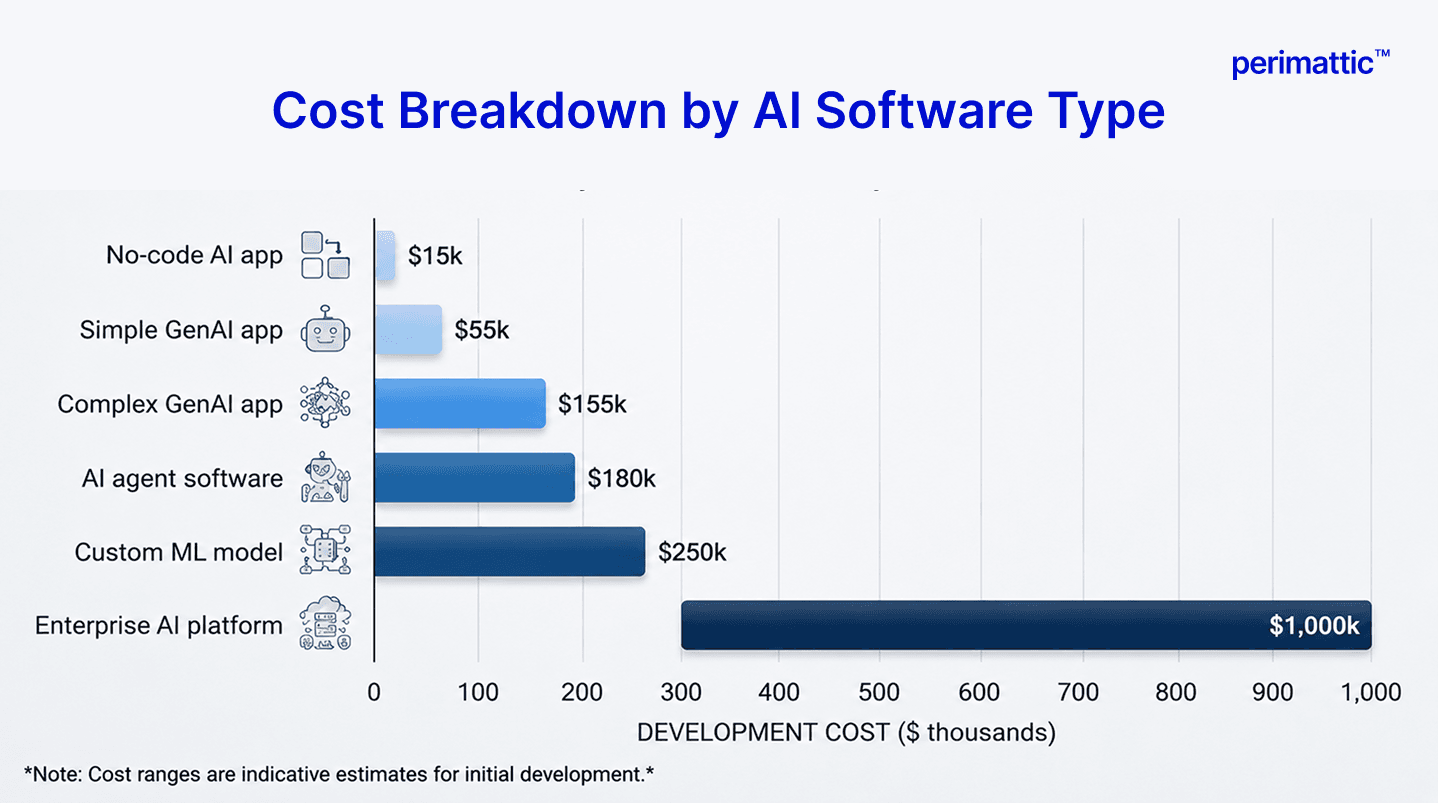
| AI Software Type | Development Cost | Timeline | Monthly API/Infra Cost* | Annual Maintenance |
|---|---|---|---|---|
| Simple GenAI App (1 LLM integration, basic UI) | $15K to $50K | 4 to 8 weeks | $50 to $500 | ~$5K to $15K/yr |
| Complex GenAI App (RAG + multi-LLM + integrations) | $50K to $150K | 3 to 6 months | $500 to $5,000 | ~$15K to $45K/yr |
| Custom ML Model (domain-specific, trained on own data) | $80K to $250K | 4 to 9 months | $200 to $2,000 (compute + hosting) | ~$20K to $75K/yr |
| AI Agent Software (multi-agent, enterprise integrations) | $75K to $200K | 3 to 6 months | $500 to $10,000+ | ~$20K to $60K/yr |
| Enterprise AI Platform (multi-model, governed, compliant) | $300K to $1M+ | 9 to 18 months | $2,000 to $50,000+ | ~$100K+/yr |
| No-Code AI App (Bubble + LLM API, standard use case) | $2K to $10K (dev time only) | 1 to 4 weeks | $200 to $1,000 | ~$2K to $6K/yr |
Put together, annual maintenance for any AI system, retraining, prompt updates, API version management, and monitoring, usually lands at 20 to 30 percent of the original development cost, every year, for as long as the system is in production.
Common Mistakes When Building AI Software (And How to Avoid Them)
Starting with the technology instead of the problem. "We'll use AI" is not a product strategy. Define the specific problem and the metric that tells you whether you solved it, before you pick any tool.
Underestimating data preparation time and cost. It typically takes two to three times longer than planned. Budget for that explicitly instead of hoping it goes faster.
Building a custom ML model when a GenAI API would do the job. Custom models are expensive and slow to build. Most 2026 use cases are better served by an existing LLM API paired with good prompt engineering.
Skipping a security review of AI-generated code. With 45 percent of AI-generated code carrying known vulnerabilities, automated security scanning through tools like Snyk, SonarQube, or GitHub Advanced Security needs to be part of your CI/CD pipeline, not an afterthought.
No monitoring after launch. AI software degrades silently. Without monitoring in place, you won't find out until your users start complaining.
Ignoring total cost of ownership. Your LLM API bill compounds as your user base grows. Model that cost curve before you commit to an architecture, not after the invoice arrives.
Not planning for regulatory compliance from day one. Bolting on GDPR or HIPAA compliance after launch typically costs three to five times more than building it in from the start.
Building everything from scratch. In 2026, pre-built LLM APIs, vector databases, and managed AI platforms save real months of work. Use them unless you have a specific, well-reasoned exception.
Should You Build AI Software In-House or Hire a Development Company?
This decision deserves a real framework rather than a sales pitch, so the comparison below can help you evaluate both approaches.
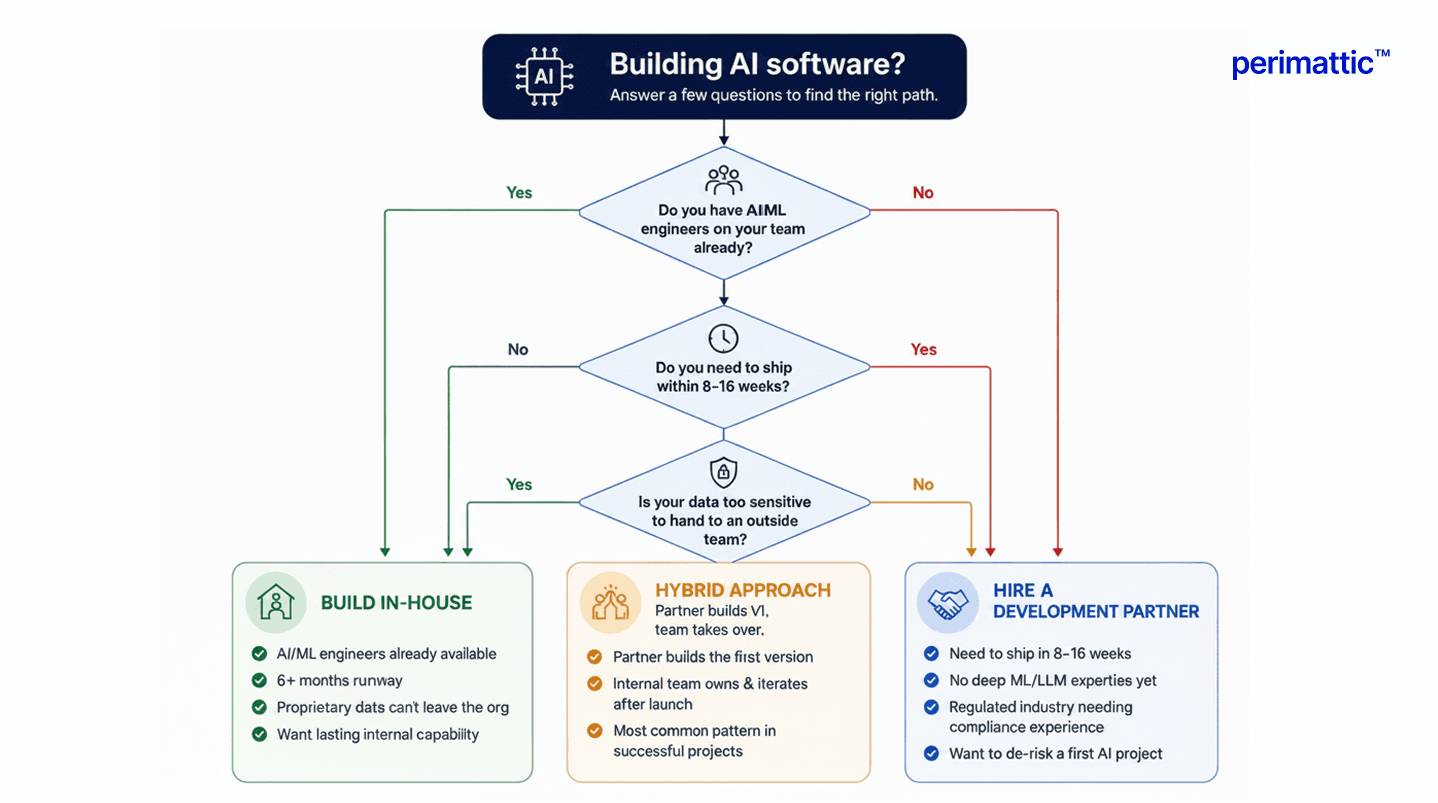
Build in-house when your team already has AI or ML engineers available, you have six-plus months of runway, your use case involves proprietary data that can't leave your organization for legal or security reasons, and you want to build lasting AI capability inside your company for the long term.
Hire a development company when you need to ship within 8 to 16 weeks, your team doesn't have deep ML or LLM engineering expertise yet, you're in a regulated industry and need compliance experience you don't have on staff, or you want an experienced partner to de-risk your first AI project.
A hybrid approach is what most successful AI software companies do: bring in an agency to build the first version, from proof of concept through to a working MVP, then build an in-house team to own and iterate on it after launch.
Perimattic has built end-to-end AI software from proof of concept through to production, across healthcare, finance, manufacturing, e-commerce, and logistics, typically delivering AI applications in 8 to 20 weeks, with full-stack capability spanning AI development, general software engineering, and ERP integration where needed. If you're weighing your options, our AI development services team can help evaluate where your specific project fits, book a free consultation to get started.
Building an AI agent specifically? Read our companion guide, How to Build an AI Agent, or see our roundup of the best AI agent development companies if you're evaluating partners. For generative AI apps specifically, our generative AI development services page has more detail, and for conversational AI, see our AI chatbot development work.