Key Takeaways
- AI agents are different from chatbots because they can reason, plan, use external tools, and complete multi-step tasks autonomously rather than simply generating responses.
- Successful AI agent development starts with planning. Clearly defining business objectives, assessing data readiness, and selecting the right development approach help reduce costs and improve project outcomes.
- Choosing the right LLM is critical since model capabilities directly affect reasoning quality, tool-calling accuracy, context handling, performance, and operational costs.
- Memory and tool integration are the foundation of capable AI agents. Combining short-term context, long-term RAG memory, and well-defined tools enables agents to perform real-world business tasks reliably.
- Agent architecture and framework selection should match the use case. Simple agents often perform well with a raw SDK, while complex workflows may benefit from frameworks such as LangChain, CrewAI, or LangGraph.
- Production-ready AI agents require more than coding. Thorough testing, observability, cost monitoring, deployment strategies, and ongoing AgentOps are essential for long-term reliability and scalability.
- No-code and low-code platforms make AI agents accessible for teams without extensive programming expertise, enabling rapid prototyping and workflow automation.
A lot of people ask what an AI agent actually is, and most of them have the same picture in their head: a smarter chatbot. It is not. Most agent projects go over budget or quietly get shelved for a couple of months due to that mix-up.
The numbers explain why the topic keeps coming up. AI agents crossed $7.6 billion in market size in 2025 and Grand View Research expects that to reach $52.6 billion by 2030. That's a real shift in how developers build software.
Here's the plain version: an AI agent is a system that uses an LLM to reason through a problem, plan out a sequence of steps, reach for tools when it needs to, and get a multi-step task done without someone approving every move along the way. A chatbot answers. An agent acts. That distinction sounds small until you're the one debugging why an "agent" replied to a support ticket with a confident, completely made-up refund policy instead of checking the CRM.
This article is written for two kinds of readers. The developers will get the real steps: picking a model, designing memory, wiring up tools, choosing an architecture, and getting it into production without it quietly draining the API budget overnight. If you are a founder or product lead trying to decide whether to build this in-house or bring in outside help, you will get honest cost ranges and realistic timelines.
What Is an AI Agent? (And How Is It Different from a Chatbot?)
Every agent, however simple or complicated, comes down to the same four pieces.
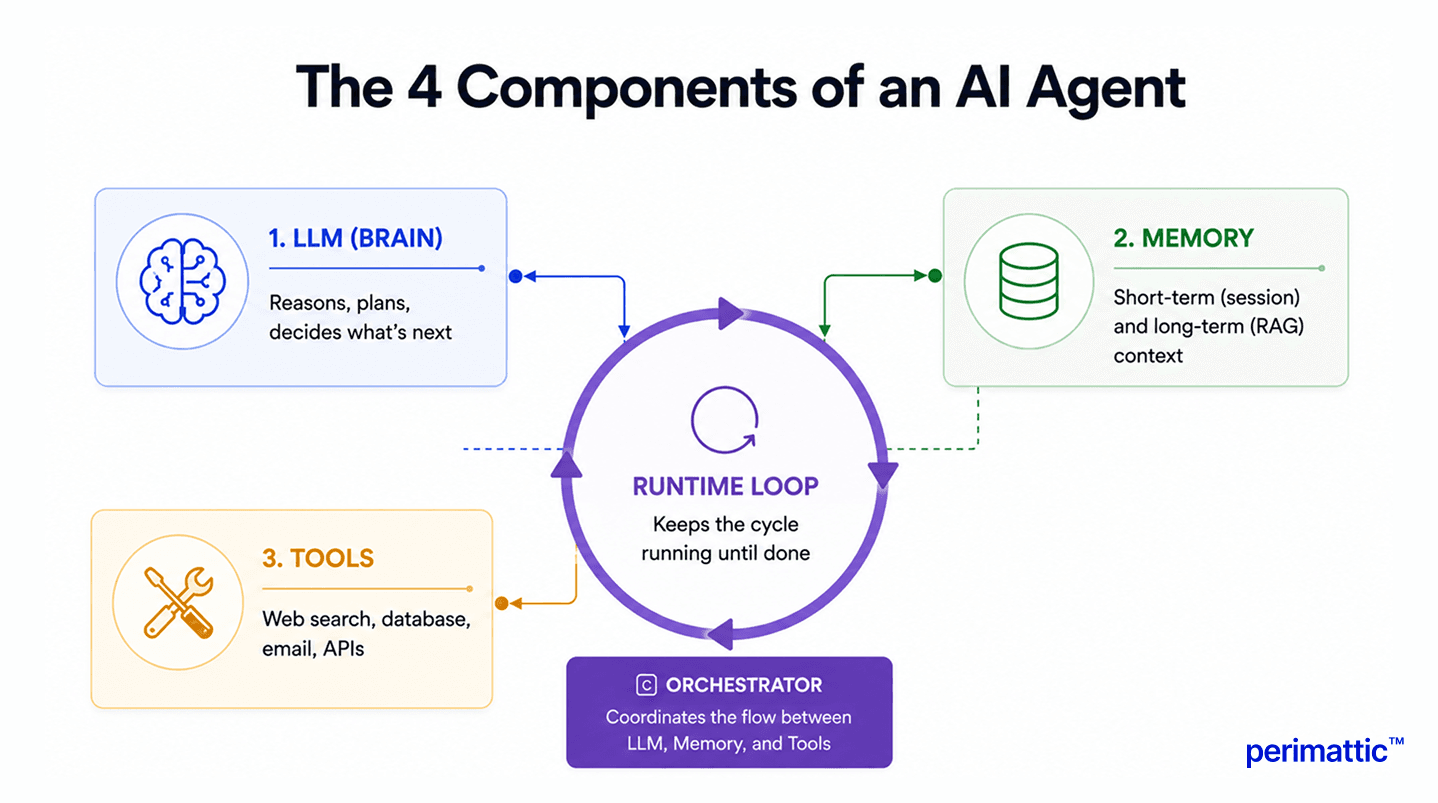
- The LLM is the brain. It reasons, plans, and decides what happens next.
- Memory knows what it knows, both within the current session and, if you set it up that way, across past ones.
- Tools are how it actually does things beyond writing text. Searching the web, hitting a database, sending an email, and calling an API.
- The runtime loop is the engine that holds it together. The bit of code keeps asking "what now?" until it actually completes the job.
Put those four together and get a loop that goes something like: observe, reason, act, reflect.
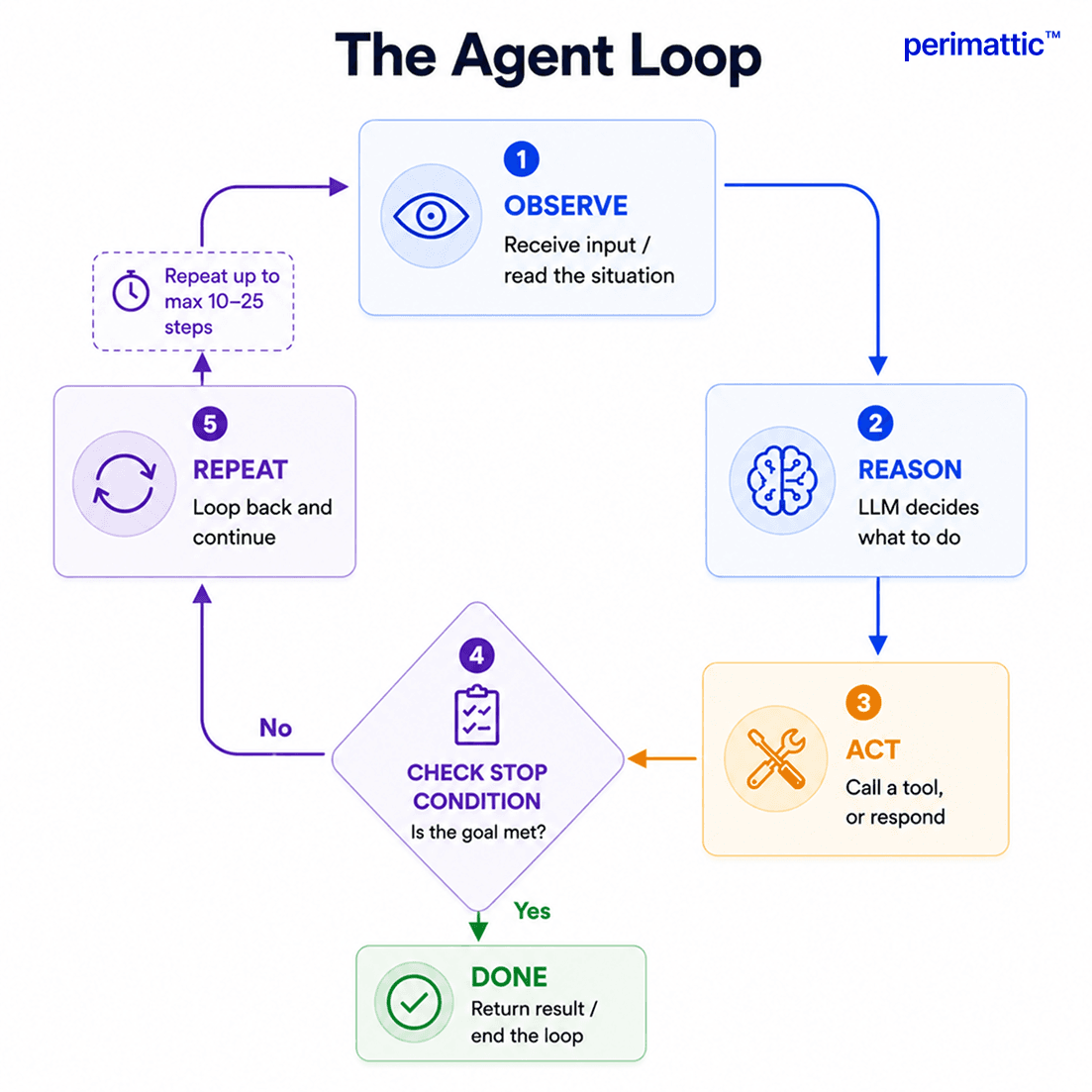 A support triage agent is a decent example. It reads an incoming ticket (observe), works out what kind of issue it is (reason), pulls up the customer's account in the CRM (act), and then decides whether to answer it directly or hand it to a human (reflect, then act again). A chatbot would just read the ticket and write something back, no checking, no deciding, nothing beyond the conversation itself.
There is a bit of technical words worth knowing, even if it rarely comes up outside a conversation:
- Reactive agents respond to whatever is in front of them, with no memory of anything before it.
- Limited memory agents can reference recent context, the way a normal chat session does.
- Goal-based agents plan a sequence of steps to hit a defined outcome.
- Utility-based agents weigh a few possible actions and go with whichever one scores best against an objective.
- Learning agents adjust their own behavior over time based on feedback.
Most developers build agents for production in 2026 that are goal-based, often adding a RAG memory layer. "AI agent" is not one fixed thing; it represents a spectrum, and the specific problem being solved determines where a build lands on it.
Before You Start: Planning Your AI Agent
The biggest mistake is not technical at all. It is skipping this step and going straight to building.
- Define the problem precisely. "Automate customer support" is not something you can build against. "Tier-1 tickets in under five minutes with 90% accuracy" is. If you cannot write a goal as one sentence with a number in it, you usually are not ready to build it yet.
- Check data readiness. What does the agent actually need to know about doing its job? Is that sitting in a clean, structured database, or scattered across PDFs, old email threads, and half-organized Slack channels? Data cleanup is the part almost nobody budgets for upfront, and it tends to show up anyway.
- Decide who's building this. In-house, an agency, or a no-code platform. Here's a simple way to compare the three.
| Criteria | Build In-House | Hire an Agency | Use a Platform |
|---|---|---|---|
| Technical Team Available | Yes, with AI/ML experience | Not required | Not required |
| Budget | Salaries + infrastructure over time | Fixed project cost | Monthly subscription |
| Timeline | Slower, especially the first agent | Faster, weeks not months | Fastest, days |
| Customization Needed | High | High | Low to medium |
| Ongoing Maintenance | You own it | Often included | Vendor handles it |
If a team already has ML experience, the use case is well defined, and there are three to six months of runway to spend on it. Building an in-house is a reasonable call. If speed matters more, that expertise is not in-house yet, or the industry is regulated enough that compliance is not optional; an outside team usually gets there faster and with fewer expensive mistakes along the way.
Step 1: Choose Your LLM (The Agent's Brain)
Model choice affects accuracy, cost, speed, how much context it can hold, and, critically for agents, how reliably it calls tools the right way. It's common for an agent to fail not because the reasoning was bad, but because the model mangled a function call format.
Here's roughly where things stand as of mid-2026.
| Model | Best For in Agents | Context Window | Tool-Call Accuracy | Cost (Input, per 1M tokens) |
|---|---|---|---|---|
| GPT-4o | Complex reasoning, structured task execution | 128K tokens | ~94% | ~$5 |
| Claude Sonnet 4.6 | Long-context reasoning, nuanced instructions | 200K tokens | ~90%+ | ~$3 |
| Gemini 2.5 Flash | High-throughput, cost-sensitive workloads | 1M tokens | ~88% | ~$0.30 |
| GPT-4o Mini | Budget-conscious agents, simple tasks | 128K tokens | ~78% | ~$0.15 |
| Llama 3.1 70B | Self-hosted, regulated or private data | 128K tokens | ~80% | Compute cost only |
A rough rule of thumb: if the task needs real reasoning, GPT-4o or Claude tends to hold up better. For high-throughput, simple calls where cost matters more than nuance, GPT-4o mini or Llama do the job fine. If data legally cannot leave a company's own infrastructure, self-hosted Llama is often the only option on the table.
Worth saying plainly: this decision is reversible. There is rarely a good reason to spend three weeks benchmarking five models before writing a line of code. Pick one, build something real, and switch later if cost or performance gives an actual reason.
Step 2: Design the Agent's Memory System
Memory comes in two flavors, and they solve genuinely different problems.
- Short-term memory is just the current conversation, held in the model's context window. This does not need to be built; the LLM handles it. The one thing to watch is that long reasoning traces in multi-step agents can quietly eat up that window, and the agent starts losing track of things it said a few steps back.
- Long-term memory persists across sessions, and this is where RAG (retrieval-augmented generation) comes in. The pattern is straightforward: embed documents into vectors, store them in something like Pinecone, FAISS, or Chroma, and at query time pull the chunks most relevant to the current request and drop them into the prompt. This is how an agent "remembers" a company's knowledge base or a customer's history, even though the model underneath has no memory of its own between calls.
- Session caching. For fast access to session state across multiple runs, Redis is the usual choice.
A sensible default is to start with short-term memory only. It is simpler, and for most first agents, it is enough. Long-term RAG memory is worth adding once the agent clearly needs domain knowledge it does not have, or needs to pick up where a previous session left off.
Step 3: Define and Build the Agent's Tools
Tools are what separate an agent from a chatbot. Without them, an LLM can only generate text. It cannot check anything, send anything, or look anything up.
Common starting tools include:
- Web search, for current information
- A calculator, for anything involving numbers
- File read and write functions
- Email sending
- Database queries
- Generic API calls
Here is the part almost nobody gets right the first time: tool description quality matters far more than tool quantity. Each tool needs a clear name, a specific description of exactly when the agent should reach for it, well-defined input parameters, and a predictable output format. A vague tool description is, in practice, the number one reason an agent grabs the wrong tool for the job.
Compare these two:
Bad: search(query)
Good: web_search(query: str) - use this tool to find current information about events, prices, or any fact you're not certain about. Returns the top five search results as text.
The second one tells the model exactly when to use it and what it will get back. That specificity is what makes tool selection reliable, and it's the kind of unglamorous work that pays off more than any framework choice.
Start with two to four tools. Test them properly. Add more only once the basics genuinely work. Every extra tool is another way for the agent to get confused, so more tools rarely translates into a better result.
Step 4: Choose Your Agent Architecture
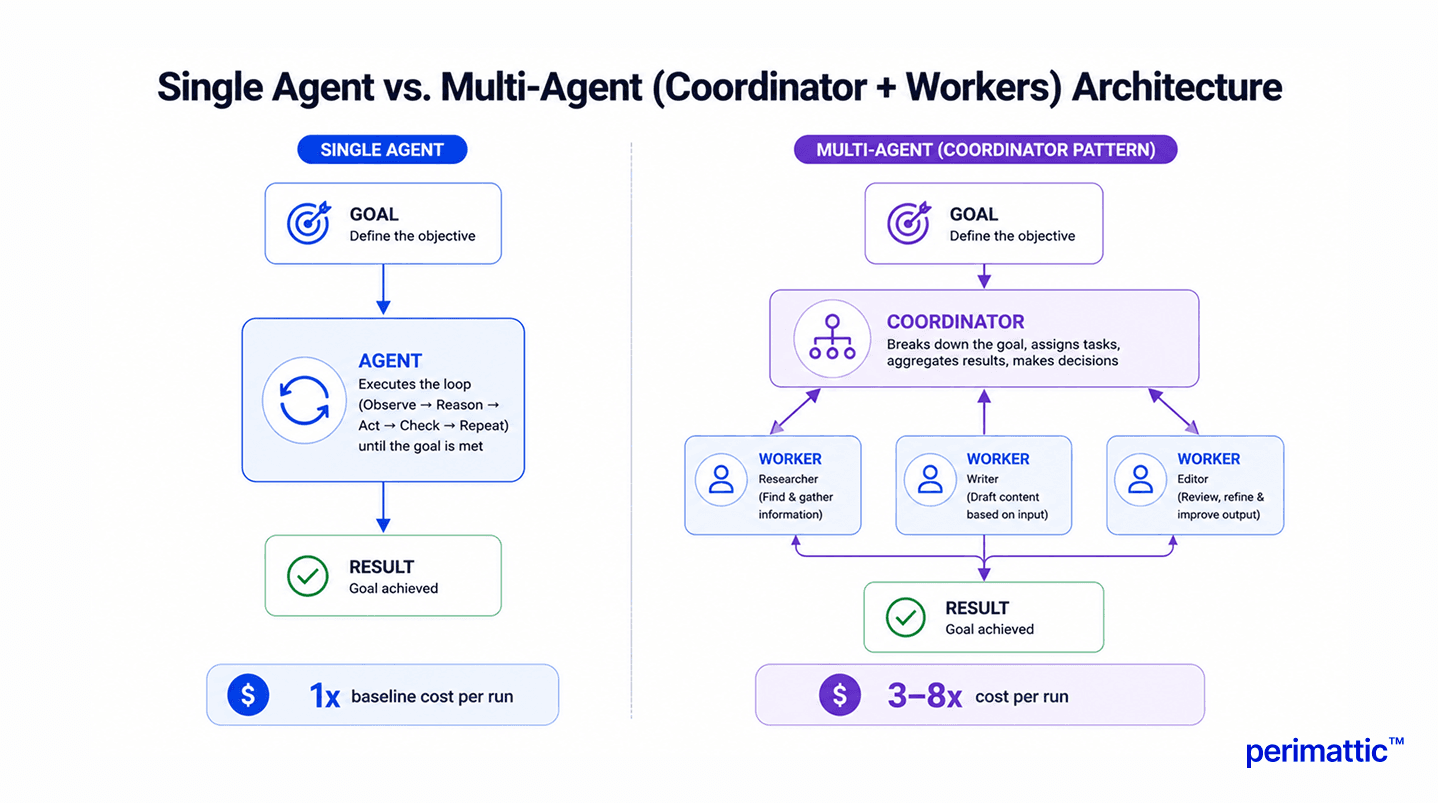
At the architecture level, the choice is between a single agent doing everything, or a multi-agent setup with a coordinator directing specialized workers.
Multi-agent systems earn their complexity when a task genuinely benefits from parallel work, needs different kinds of expertise (research, then writing, then editing, say), or is too large to fit comfortably in one context window. That's the whole list.
The catch: multi-agent systems typically run three to eight times more expensive per run than a single agent doing the same job, simply because there are multiple LLM calls instead of one. It is worth adding that complexity only when there is a real, measurable improvement in quality or speed to point to. "It sounds more sophisticated" has never been a good enough reason on its own.
For a single agent, the standard pattern is ReAct, short for reason and act. It's a simple thought, action, observation loop, and it's popular because it's easy to debug and easy to extend.
For multi-agent setups, the coordinator pattern is the default: a coordinator agent takes the overall goal, breaks it into pieces, hands those pieces to specialized worker agents, collects what comes back, and stitches together a final answer. Each worker gets a narrow, focused prompt and a small set of tools relevant to just its job.
Step 5: Pick Your Framework (Or Go Frameworkless)
This is where most people get stuck, partly because a lot of content online treats LangChain, CrewAI, and AutoGen as interchangeable. They are really not and picking the wrong one for a given use case can cost weeks.
- LangChain makes sense for heavy RAG work with multiple retrieval sources, or when five or more pre-built integrations are needed, tools like Notion, Slack, or GitHub. It has the biggest ecosystem out there, but that comes at a cost: it is also the heaviest in dependencies, with enough abstraction that it can slow things down when trying to figure out what is actually happening underneath.
- LangGraph is built for complex, non-linear workflows where explicit control over execution as a graph, rather than a straight sequence, is needed. It's become LangChain's underlying runtime, so it's a natural extension for teams already in that ecosystem.
- CrewAI is purpose-built for role-based multi-agent teams, think researcher, writer, editor, each with a defined role. A working pipeline can be up in about 30 lines of code. It's a strong fit specifically for content and research-style workflows.
- AutoGen is designed for conversational multi-agent systems and workflows with a human checking in partway through. It's currently moving toward a unified framework under Microsoft, so it's worth checking current release notes before committing to it for anything long-term.
- The raw Anthropic or OpenAI SDK is the option most people underestimate. For learning, single-loop agents, or production systems that need full control with zero framework lock-in, a working agent can be built in about 60 lines of code. No abstraction layers to fight, no dependency chain to untangle when something breaks.
Here's the full comparison in one place.
| Framework | Best For | Avoid When | Learning Curve | GitHub Stars* |
|---|---|---|---|---|
| LangChain | Heavy RAG, 5+ tool integrations, broad ecosystem | You need full control or simple single agents | Medium | 95K+ |
| LangGraph | Complex stateful, non-linear workflows | You need a simple linear agent | High | 10K+ |
| CrewAI | Role-based multi-agent teams | Single agents, anything outside content/research | Low to Medium | 20K+ |
| AutoGen | Conversational multi-agent, human-in-the-loop | Production stability is critical right now | Medium | 35K+ |
| Raw SDK (Anthropic/OpenAI) | Learning, single-loop agents, full control | You need 10+ pre-built integrations | Low | N/A |
| n8n (No-Code) | Non-technical teams connecting existing tools | Complex custom tool logic, regulated data | Very Low | Open source |
| LangFlow (Low-Code) | Visual prototyping, drag-and-drop agent design | Production-scale deployment without engineering support | Low | 40K+ |
For a first or second agent, the raw SDK is usually the better starting point, it teaches what is going on under the hood. CrewAI fits when a role-based crew is genuinely needed. LangChain earns its complexity for serious RAG work. For most everything else, the raw SDK tends to get results faster than fighting a framework's assumptions about how a project should be structured.
Worth saying plainly: framework choice matters a lot less than most people think. Context architecture and tool description quality do more for an agent's reliability than which package gets installed. A week spent choosing a framework is usually better spent writing clearer tool descriptions.
Step 6: Build and Test Your Agent Locally
Write the system prompt first. It needs to cover the agent's role, task instructions, guidance on when to use each tool, the expected output format, and the tone required. Vague system prompts produce vague, unpredictable behavior, consistently.
Then implement the agent loop. The pattern is: observe, reason (call the LLM), act (call a tool if needed), check whether the stop conditions met, repeat. Always cap the number of steps, somewhere between 10 and 25 is usually enough for most production tasks. An agent without a step cap will, sooner or later, loop forever and quietly burn through the budget while doing it.
Here's a simplified Python example using the OpenAI SDK.
from openai import OpenAI


client = OpenAI()

MAX_STEPS = 10

messages = [

    {

        "role": "system",

        "content": "You are a helpful AI assistant that can use tools when required."

    }

]


user_input = input("Enter your request: ")


messages.append(

    {

        "role": "user",

        "content": user_input

    }

)


for step in range(MAX_STEPS):


    response = client.responses.create(

        model="gpt-4o",

        input=messages

    )


    output = response.output_text


    print(output)


    if "TASK COMPLETE" in output.upper():

        break


    messages.append(

        {

            "role": "assistant",

            "content": output

        }

    )
That's it in outline. The real work is in execute_tool, the tool definitions, and the system prompt. The exact tool-calling schema varies a bit by provider, so switching models later usually means checking the current docs rather than assuming the format carries over unchanged.
Before calling it done, run through this checklist:
- Does it complete the task on the straightforward path?
- What happens when a tool call fails?
- What happens when the goal is genuinely ambiguous?
- Does it respect the step cap, or does it push right up against it every time?
- What's the average cost per run, once it is measured instead of estimated?
While developing, verbose logging is worth turning on so every reasoning step is visible. It's tedious to read at first, but it's the fastest way to catch a bad tool description or a confusing prompt before it becomes a production problem.
Step 7: Add Memory for Persistent Context
If an agent needs to remember things across sessions, a user's preferences, prior interactions, specialized domain knowledge, this is where the vector database comes in.
The flow is the same one covered in Step 2: embed the content, store it in Pinecone, FAISS, or Chroma, retrieve the relevant chunks when a query comes in, inject them into the prompt. Redis handles fast session-state caching between runs if that's needed too.
Keep it simple to start. Most first-version agents do not need long-term memory at all. It is worth adding once users start asking about things the agent "should already know" and clearly doesn't.
Step 8: Deploy to Production
This is the step almost every other guide skip, which is a shame, because it's genuinely where most of the real difficulty lives. A local prototype that works fine in a terminal is a long way from something that holds up at scale.
-
Containerize it. Wrap the agent in a FastAPI app, package it with Docker, deploy on Kubernetes if scaling past a single instance.
-
Choose cloud deployment. AWS Bedrock fits naturally for AWS-based stacks. Azure OpenAI Service is the equivalent for a Microsoft-centric stack. GCP Vertex AI works well inside the Google ecosystem. All three give managed access to major LLMs with enterprise-grade SLAs, which matters once uptime is on the line.
-
Set up observability. LangSmith is built for tracing LangChain-based agents specifically. Weights & Biases handles broader model monitoring. Azure Application Insights covers enterprise logging needs. Whichever tool gets picked, log every tool call, every reasoning step, every output. When something goes wrong in production, and it will, this is the only way to actually figure out why.
-
Control costs deliberately. Set a token budget per run. Track the real cost of each execution, not just the estimate from planning. Set alerts for when costs cross a defined threshold. In multi-agent systems especially, costs compound fast and can go unnoticed until the invoice shows up.
-
Think about triggers. For high-throughput, event-driven activation, something like Apache Kafka handles the volume well. For simpler use cases, a FastAPI webhook is usually enough. On a document-processing system built with Kafka-based workflow orchestration, that kind of event-driven pipeline is what made it possible to scale document volume roughly tenfold without adding headcount, while cutting processing time by 67% and manual errors by 90%.
-
Plan for AgentOps. Ongoing prompt governance, adjusting when model behavior drifts over time, watching for hallucination patterns in tool calls before they cause real damage. Agents aren't a build-it-once-and-walk-away kind of system. They need the same ongoing attention any production software does, arguably more, because the failure modes are less predictable.
How to Build an AI Agent Without Code
Not everyone building an agent is going to write Python, and that is fine. A growing number of genuinely useful agents get built entirely through visual, no-code or low-code platforms.
-
n8n is open-source workflow automation with dedicated AI agent nodes. It's particularly good at connecting existing tools like Slack, Gmail, and a CRM with AI-driven decision-making, and it offers a self-hosted option for sensitive data.
-
Zapier Agents allow building no-code agents that automate workflows across more than 6,000 connected apps. A strong fit for simple, high-volume automation without dedicated engineering resources.
-
LangFlow is a low-code visual builder for LLM and agent workflows, built on top of LangChain. Drag-and-drop design, with the option to drop into code for custom logic.
-
Microsoft Copilot Studio is a low-code agent builder that lives inside the Microsoft 365 ecosystem, a natural choice for enterprises already standardized on Microsoft tools.
-
Vellum takes more of a prompt-to-build approach: describe what the agent should do, and it handles orchestration, tool connections, and deployment.
General rule: reach for no-code when the workflow is simple, engineering resources are limited, or the goal is just to prototype something quickly to see if the idea holds up. Move to actual code once complex custom integrations or non-standard tool logic are needed, or when a regulated industry requires full visibility into what the system is actually doing.
Common Mistakes When Building AI Agents (And How to Avoid Them)
Most agent failures aren't mysterious. They're the same handful of mistakes, repeatedly.
-
No step cap. An agent without a max_steps limit will eventually loop forever and quietly rack up cost while it does. Always set a limit, somewhere between 10 and 25 steps for most tasks.
-
Poor tool descriptions. The single most common cause of an agent picking the wrong tool for the job. Worth spending more time here than most teams think it deserves.
-
Jumping straight to multi-agent. Most use cases genuinely don't need it. Start with one agent. Add complexity only once the simple version has proven not to be enough.
-
Skipping output validation. An agent with no guardrails will hand over a wrong answer with the same confident tone as a right one. Add validation checks before trusting the output for anything that actually matters.
-
Ignoring cost until it's a problem. Multi-step reasoning and repeated tool calls add up faster than expected. Set per-run budgets from day one, not after the first surprising invoice.
-
Building on dirty data. An agent is only as good as the data it's working from. Even the strongest model can't compensate for messy, inconsistent, or incomplete source data.
-
No observability. It's hard to debug or improve a system that can't be seen inside of. Add logging from the very first version, not after something's already broken in production.
-
Over-relying on the framework to fix reliability. A recent LangChain survey found that 32% of teams cite unreliable performance as their top obstacle. The actual fix is rarely a better framework, it's usually better context architecture and clearer tool descriptions. Swapping frameworks rarely fixes a problem that was really about prompt design the whole time.
How Much Does It Cost to Build an AI Agent?
There are two separate costs here: what the model itself costs to run, and what it costs to build and maintain the system.
On the model side, rough token pricing looks like this as of mid-2026 (worth verifying current numbers before planning a budget around them, since providers adjust rates often):
- GPT-4o: about $5 per million input tokens, $15 per million output tokens.
- Claude Sonnet 4.6: around $3 per million input tokens, $15 per million output.
- GPT-4o mini: roughly $0.15 per million input tokens.
- Llama 3.1 70B (self-hosted): no per-token fee, just compute costs.
Translated into cost per agent run:
- Simple single-step agent: $0.001 to $0.01 per execution.
- Mid-complexity agent, five steps with RAG lookups: $0.05 to $0.20.
- Complex 20-step multi-agent system: $0.50 to $2.00 or more per run.
Multiplying that by expected volume gives a far more realistic monthly figure than most estimates floating around online.
On the development side, rough industry ranges look like this:
- Simple custom agent: two to four weeks, roughly $10,000 to $30,000.
- Mid-complexity agent with real enterprise integrations: six to twelve weeks, $50,000 to $150,000.
- Full enterprise multi-agent system: three to six months or longer, often $200,000 and sometimes reaching $500,000 depending on scope.
If weighing build versus hire purely on cost, it's worth looking past the number on the first quote. Building in-house means paying for team time, infrastructure, and maintenance indefinitely, and that adds up quietly over a year in a way most initial budgets don't account for.
When to Build In-House vs Hire an AI Agent Development Company
There's no single right answer here. It comes down to a few honest questions.
If there's a technical team with genuine AI or ML experience, a well-defined use case, and three to six months of runway to invest, building in-house is a reasonable path. It results in deep internal knowledge of the system, and no dependency on an outside vendor for every future change.
If speed matters more, that expertise isn't in-house yet, there are complex integrations across multiple systems, or the industry is regulated enough (healthcare, finance) that getting it wrong actually costs something, bringing in a team that builds these regularly tends to be the more efficient call.
Perimattic's own case studies give a sense of what that looks like in practice.
-
A RAG-based document processing and knowledge system built for a consulting firm cut the time to find critical information by 65% and reduced document preparation time by 50%, shrinking research cycles from a full day down to a few hours.
-
A separate document automation system built for a paperwork-heavy operation cut processing time by 67%, reduced manual errors by 90%, and supported roughly 10x document volume growth without adding headcount, reaching positive ROI within 90 days of deployment.
Neither of these were framed as "agents" in the marketing sense, but both follow the same observe-reason-act pattern this guide has been describing throughout: intelligent document understanding, automated validation with human-in-the-loop exception handling, and workflow orchestration tied together end to end.