

Key Takeaways
- Choose based on your application, not popularity. There is no universally “best” vector database. The right choice depends on your data volume, query patterns, latency requirements, budget, and technical constraints.
- Test performance at your expected scale. A database that performs well with thousands of vectors may behave very differently with millions or billions. Evaluate latency, recall, throughput, and filtered-search performance using realistic workloads.
- Consider deployment requirements early. Managed cloud, self-hosted, and embedded databases offer different trade-offs in terms of scalability, operational effort, control, security, and data residency.
- Look beyond basic similarity search. Metadata filtering and hybrid search can be critical for production AI applications, particularly when users need both semantic relevance and exact keyword matching.
- Calculate total cost of ownership. Compare storage, compute, query, indexing, infrastructure, monitoring, and engineering costs-not just the advertised database price. Also account for future re-embedding and migration costs.
- Evaluate ecosystem and integrations. Make sure the database works well with your embedding model, LLM framework, application stack, monitoring tools, and existing infrastructure.
- Plan for data updates. If your application requires frequent inserts, updates, or deletes, verify how the database handles changing data and whether indexing or query performance is affected.
If you have spent any time building with large language models, you have probably hit the same wall everyone else does. Your model is smart, but it does not know anything about your data. It cannot answer questions about your company's documents, your product catalog, or your customer's support history, because none of that ever showed up in its training set.
This is the exact problem a vector database solves. And if you are reading this, you are probably at the point where "just use an in-memory list of embeddings" has stopped working, and you need something that can scale.
The tricky part is that there is no shortage of options now. New vector databases seem to launch every few months, each one claiming to be faster, cheaper, or easier to run than the last. So how do you actually pick one that fits your application, instead of picking whichever one has the loudest marketing?
That is what this guide is for. We will walk through what a vector database actually does, the criteria that matter most when evaluating one, and a practical framework you can use to make the decision without spending three weeks benchmarking every option on the market.
What Is a Vector Database, and Why Do You Need One
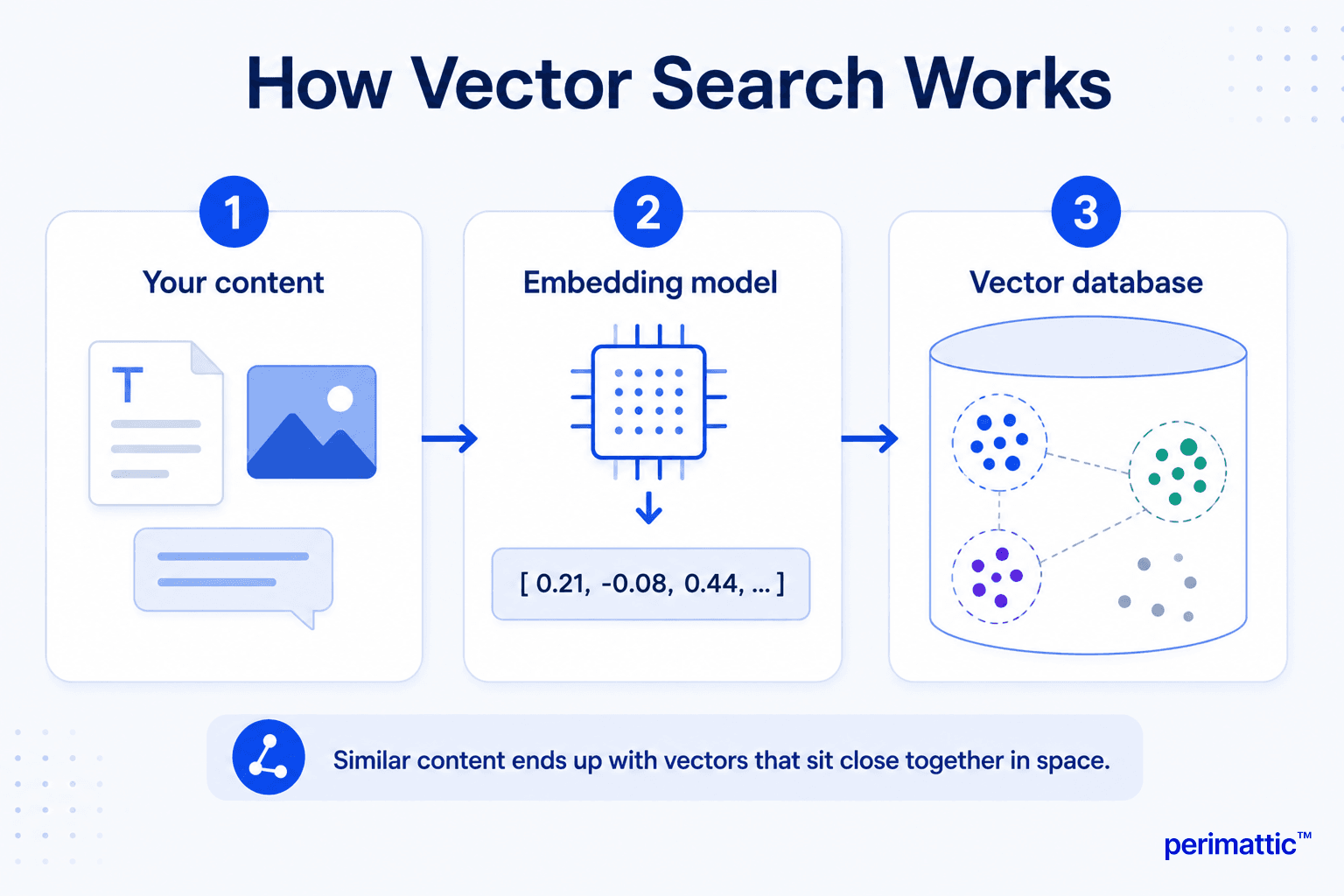
A vector database is a system built to store and search through embeddings, which are numerical representations of your data. When you feed a piece of text, an image, or even audio through an embedding model, it comes out the other side as a list of numbers, usually somewhere between 384 and 3072 dimensions depending on the model. Items that are semantically similar end up with numbers that are mathematically close to each other.
A traditional database is built to find exact matches. You search for a customer ID, and it either exists in the table or it does not. A vector database is built for a different kind of question: given this piece of text, find me the other pieces of text that mean something similar, even if they do not share a single word in common.
This is the backbone of retrieval-augmented generation, or RAG, which is how most production LLM applications ground their answers in real, up to date information instead of relying purely on what the model memorized during training. It is also how modern recommendation engines, semantic search bars, image similarity tools, and fraud detection systems work under the hood.
If your application needs to search by meaning rather than by keyword, you need a vector database. The question is just which one.
The Core Criteria That Actually Matter
There is a lot of noise in vector database comparisons, so let's cut through it and focus on the factors that will genuinely affect whether your application works well in production.
1. Query Performance at Your Actual Scale
Every vector database looks fast in a demo with ten thousand vectors. The real test is what happens at the scale you will actually operate at, whether that is one million vectors or one billion. Most vector databases rely on an approximate nearest neighbor algorithm, commonly HNSW (Hierarchical Navigable Small World) or IVF (Inverted File Index), to avoid comparing your query against every single vector in the database. These algorithms trade a small amount of accuracy for a large amount of speed. The important thing to check is how each database's implementation holds up as your dataset grows, and how much control you get over the tradeoff between recall (how many of the true nearest neighbors you actually find) and latency.
Ask yourself: • How many vectors will you have in six months, not just today? • What latency does your application actually need? A chatbot might tolerate 200ms, a real-time recommendation widget might not. • Does the database support filtered search efficiently, meaning can it search by meaning and by metadata (like "only show results from the last 30 days") without a huge performance hit?
2. Deployment Model
Vector databases generally fall into three camps, and each one comes with real tradeoffs.
Managed cloud services handle infrastructure, scaling, and uptime for you. You trade some control and, often, higher cost for speed of setup and less operational overhead. Self-hosted open source options give you full control over your infrastructure and data residency, but you own the operational burden of scaling, backups, and monitoring. Embedded or library-style databases run inside your application process, which is great for prototypes, small applications, or edge deployments, but usually is not built for high concurrency or massive scale.
Your choice here often comes down to your team's operational maturity. A two person startup might not want to run a distributed cluster. A regulated enterprise might not be allowed to send data to a third party at all.
3. Metadata Filtering and Hybrid Search
Pure vector similarity search is powerful, but it rarely works alone in a real application. You almost always need to combine it with filters, like restricting results to a specific user, category, date range, or permission level. You may also want hybrid search, which blends vector similarity with traditional keyword based search (often BM25), since pure semantic search sometimes misses exact matches like product codes, names, or acronyms.
Check whether the database supports:
• Pre-filtering (applying the filter before the vector search) versus post-filtering (filtering after), since post-filtering can silently return fewer results than you expect • Native hybrid search, or whether you will need to build that logic yourself • Complex filter expressions, not just simple equality checks
4. Cost Structure
Vector database pricing can be deceptively complicated. Some charge by the number of vectors stored, others by compute or "pod" size, others by read and write operations, and some by a combination of all three. A database that looks cheap at ten thousand vectors can become surprisingly expensive at ten million, especially once you factor in the cost of keeping indexes in memory for speed.
Before committing, model out your expected costs at three points: today, six months from now, and eighteen months from now. Include the cost of re-embedding and re-indexing your data if you ever need to switch embedding models, which happens more often than people expect.
5. Ecosystem and Integration
Your vector database does not operate in isolation. It needs to fit into the rest of your stack, including your embedding model provider, your orchestration framework, and your existing infrastructure.
Look at how well each option integrates with the tools you already use, how active its documentation and community are, and how quickly issues get resolved when something breaks. A database with a smaller feature set but excellent documentation and an active community can be a better choice than a feature rich option that leaves you stuck when something goes wrong at 2 a.m.
6. Data Consistency and Update Handling
Some applications need vectors to update in near real time, like an e-commerce catalog where products go in and out of stock constantly. Others can tolerate batch updates once a day. Check how each database handles inserts, updates, and deletes, and whether frequent updates degrade query performance or require periodic index rebuilding.
A Practical Framework for Choosing
Rather than trying to find the "best" vector database in the abstract, work through these steps in order.
Step 1: Define your scale honestly. Write down your expected vector count today and in a year, your expected query volume, and your latency requirements. Be honest rather than optimistic. Overestimating slightly is safer than underestimating. Step 2: Decide your deployment constraints. Are there legal, compliance, or data residency requirements that rule out managed cloud services? Does your team have the capacity to operate a self-hosted cluster? This step alone often eliminates half the options on the market. Step 3: List your must-have features. Do you need hybrid search on day one? Multi-tenancy? Role-based access control? Write these down before you start comparing products, so you are not swayed by features you do not actually need. Step 4: Shortlist three options. Based on the above, you should be able to narrow the field to two or three realistic candidates rather than a dozen. Step 5: Run a real benchmark with your own data. This is the step people skip most often, and it is the one that matters most. Take a representative sample of your actual data, embed it with the model you plan to use, and load it into each candidate. Measure query latency, recall, and cost at your expected scale, not the vendor's demo scale. Step 6: Consider the exit cost. Ask what it would take to migrate away from this database in a year if it does not work out. Vendor lock-in is real in this space, particularly with proprietary indexing formats.
Common Mistakes to Avoid
A few patterns come up repeatedly when teams choose the wrong vector database for their needs.
• Over-indexing on benchmark leaderboards. Published benchmarks are useful directionally, but they rarely reflect your actual data distribution, query patterns, or hardware. Treat them as a starting point, not a final answer. • Ignoring operational cost. The sticker price of a managed service often looks worse than self-hosting, until you count the engineering hours spent tuning, monitoring, and scaling an open source cluster. • Choosing based on today's scale alone. A database that handles 100,000 vectors beautifully might fall apart at 50 million. Plan for growth from the start. • Skipping the filtering test. Teams frequently discover, after launch, that their chosen database's filtering performance degrades badly under real world query patterns. Test this early. • Underestimating re-embedding costs. Embedding models improve constantly. If you switch models later, you will likely need to re-embed and re-index your entire dataset. Choose a database that makes this process manageable.
Final Thoughts
There is no single vector database that is right for every application, and anyone who tells you otherwise is probably selling one. The right choice depends on your scale, your team's operational capacity, your budget, and the specific way your users will query the system.
The good news is that most of the leading options today are genuinely capable, well documented, and actively maintained. Your job is not to find a mythical perfect database. It is to match your actual, honestly assessed requirements against a shortlist of solid candidates, and then validate that match with your own data before you commit.
Take the time to run that benchmark. It is the single highest leverage step in this entire process, and it will save you from a painful migration six months down the line.