
Shopify Analytics reports, extended past gross profit
Brandnata connects to Shopify Analytics through the same Shopify app install you approve with OAuth for your store, in about 5 minutes. The connection is read-only by default, and Shopify Analytics data is reconciled with every other channel you connect in one dashboard.
Shopify Analytics gives every store sales, profit, acquisition and behavior reports, plus custom reports and the ShopifyQL editor. Brandnata rebuilds the same figures from the orders, refunds and product costs your Shopify store connection already reads, using Shopify's own definitions of gross sales, net sales and gross profit, then adds payment fees, ad spend and marketplace orders.
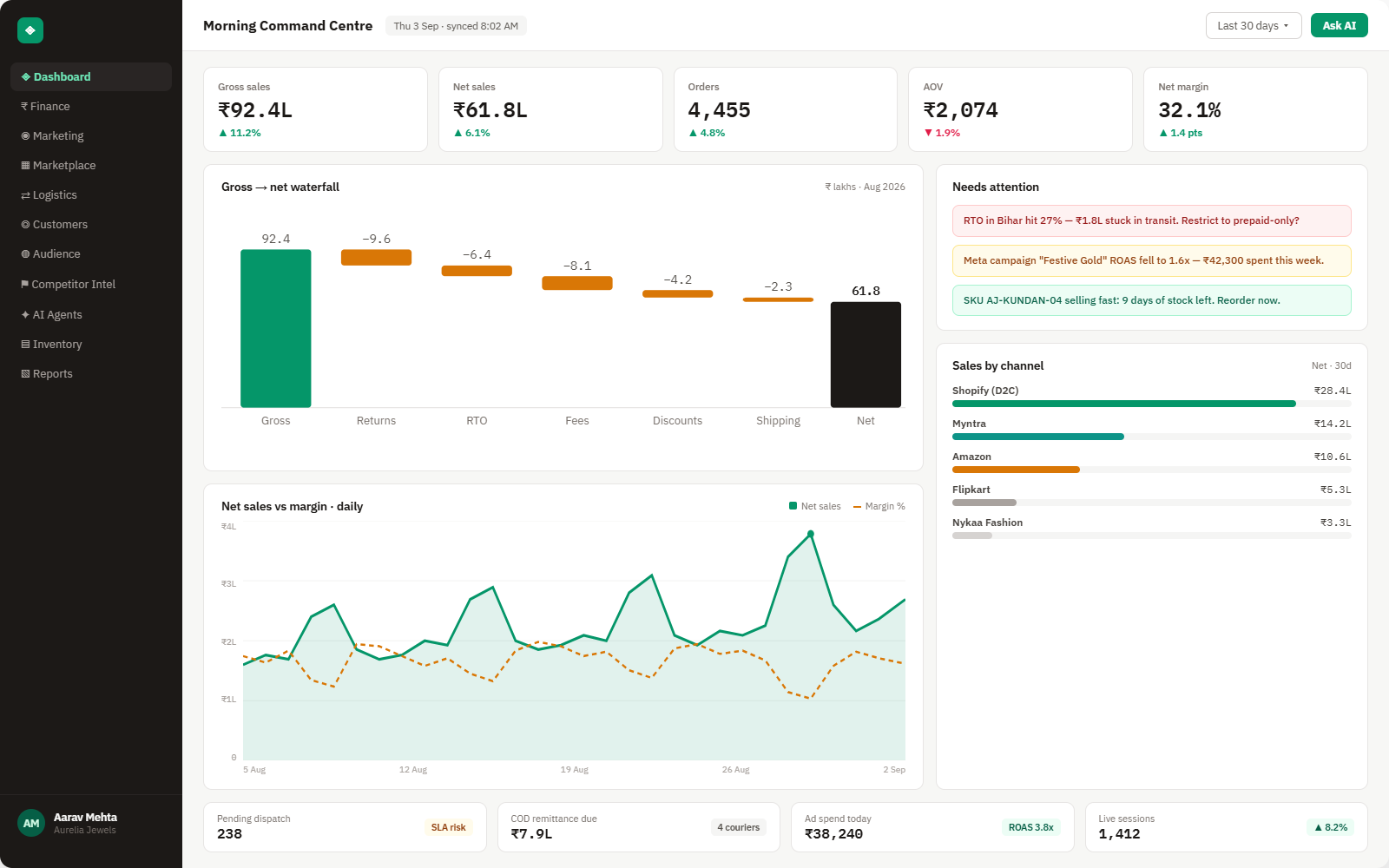
Everything Shopify Analytics sends into Brandnata
Orders, refunds, discounts and product costs arrive through your Shopify store connection as they happen, and Brandnata recalculates Shopify-style sales and gross profit from them. Today's totals are treated as in progress until the day closes.

Sales breakdown
Gross sales, discounts, sales reversals, net sales, shipping charges, taxes and total sales, defined exactly as Shopify Analytics defines them.
Gross profit & margin
Gross profit and margin by product, variant, order and market, calculated the way Shopify's profit reports do, from the cost recorded when each item sold.
Discounts & returns
Discount codes, automatic discounts, refunds and returns per order and product, the sales reversals Shopify subtracts on the way to net sales.
Variants without a cost
Products and variants that sold with no cost recorded, which Shopify's profit reports leave out, listed with the net sales they carried.
How Brandnata uses Shopify Analytics data
Shopify Analytics stays the reference for storefront sales. Brandnata calculates gross sales, net sales and gross profit with Shopify's definitions, subtracts payment fees from Shopify Payments or Razorpay and ad spend from Meta Ads and Google Ads, and adds Amazon and other marketplace sales, so every step from Shopify's figure to net profit is visible.

Shopify Analytics data feeds Brandnata's anomaly alerts and AI agent suggestions. The connection itself only reads data and never changes anything in Shopify Analytics.
What you can do with Shopify Analytics in Brandnata
Specific, Shopify Analytics-native use cases, not a generic list that applies to every connector the same way.
Start from Shopify's gross profit and subtract payment fees from Shopify Payments, Razorpay or Stripe, ad spend from Meta Ads and Google Ads, and fulfillment costs, so each product shows what it really earns.
Shopify's profit reports leave out variants that had no cost recorded when they sold. Brandnata lists those variants and the net sales they carried, so the gap is fixed at the source.
Because Brandnata keeps Shopify's own definitions of gross, net and total sales, storefront figures agree with Shopify Analytics, and any difference can be traced to a specific order or date range.
Where Brandnata + Shopify Analytics fits
Other ways teams currently piece this data together, and where each one runs out of reach.
| Approach | Coverage | Where it falls short |
|---|---|---|
| Brandnata + Shopify Analytics · this page | Shopify's own sales and gross profit figures, carried through payment fees, ad spend and marketplace sales to net profit per product and channel | N/A |
| Shopify Analytics and reports (native) | Sales, profit, acquisition, behavior, inventory and finance reports, custom reports and the ShopifyQL editor on every plan | Gross profit is net sales minus cost of goods only, counts only items with a recorded cost, and leaves out ad spend and payment fees |
| Report-builder apps | Extra report templates and scheduled exports of Shopify store data | Still limited to what Shopify records, so ad platforms and marketplaces outside Shopify stay out of the picture |
| Spreadsheets | Shopify report exports combined with payout statements and ad platform downloads | Each month's sheet is rebuilt by hand, and definitions drift as different people prepare it |
Shopify Analytics works alongside every other connector
Data from Shopify Analytics doesn't sit in isolation, it's matched against orders, customers and spend from every other platform you connect, so the full picture shows up automatically.
Related connectors
Brands using Shopify Analytics usually connect these too.
Orders, revenue, products, customers and inventory, synced live.
Shopify Payments payouts, card fees, chargebacks and currency conversion, matched to the orders behind them.
Traffic, channels, landing pages and funnels, checked against real orders.
Campaigns, spend, ROAS and audience performance, tied to real revenue.
Shopify Analytics integration FAQs
Shopify Analytics details on this page were last checked against Shopify Analytics's own documentation on .
How do I connect Shopify Analytics to Brandnata?
Connect your Shopify store. There's no separate Shopify Analytics login: Brandnata uses the same Shopify app install you approve with OAuth, and rebuilds Shopify's sales and profit figures from the orders, refunds and costs it reads. If your store is already connected, there's nothing more to set up, and the figures appear beside your other channels.
Which Shopify plans include Analytics and custom reports?
All of them. Shopify's help center says the main Analytics features are available on any plan, and its pricing page lists 200+ real-time reports plus custom analytics on Basic, Grow, Advanced and Plus alike. There's no extra charge for Analytics. In India, the Basic plan is ₹1,994 a month, or ₹1,499 a month billed yearly.
What is the difference between gross sales and net sales in Shopify?
Gross sales is sales revenue before discounts and sales reversals, such as returns, are taken off. Net sales is gross sales minus discounts and sales reversals. Total sales then adds shipping charges, taxes, duties and other fees to net sales. Brandnata uses these same definitions, so its storefront figures reconcile with your Shopify reports.
Why isn't Shopify's gross profit my real profit?
Shopify calculates gross profit as net sales minus cost of goods sold, and only for products and variants that had a cost recorded when they sold. Payment processing fees and ad spend aren't part of that formula, and items sold without a cost are left out. Brandnata adds those costs back in and lists the variants missing one.
What is ShopifyQL, and can apps use it?
ShopifyQL is Shopify's query language for commerce data, used in the ShopifyQL editor inside Shopify Analytics. Apps can run ShopifyQL through the GraphQL Admin API with the read_reports scope and approval for protected customer data. Brandnata doesn't rely on it: it recalculates the same figures from order-level data, so each total can be traced to individual orders.
How is this different from Brandnata's Shopify integration?
It's the same connection seen from another angle. The Shopify integration covers syncing orders, products, customers and inventory for profit by channel. This page covers Shopify's native Analytics and reports: what they measure, how Shopify defines each figure, and where Brandnata takes over, such as fees, ad spend and sales on marketplaces outside Shopify.
Can Brandnata change my Shopify reports or store settings?
No. Reading store data doesn't change anything in Shopify. Brandnata doesn't edit, save or delete your custom reports, explorations or ShopifyQL queries, and it doesn't alter product costs. Any action on your storefront, such as pricing or inventory, is a separate permission covered by the Shopify integration, and it stays off unless you turn it on.

Connect Shopify Analytics in about 5 minutes
Connects through the same Shopify app install you approve with OAuth for your store. Read-only to start, with your first reconciled numbers within a day.